

Already selling on MorphMarket? Bring your live, for-sale animals across, photos included, from your own export file. Only your animals can come over, because it's your file. Your MorphMarket listings stay exactly as they are: bask reads the file and nothing else.
1. Export from MorphMarket
- Log in to MorphMarket and open your animals (Manage → My Animals).
- Use the export option on that page and save the
.csv(or.json) file.
2. Scan the file on bask
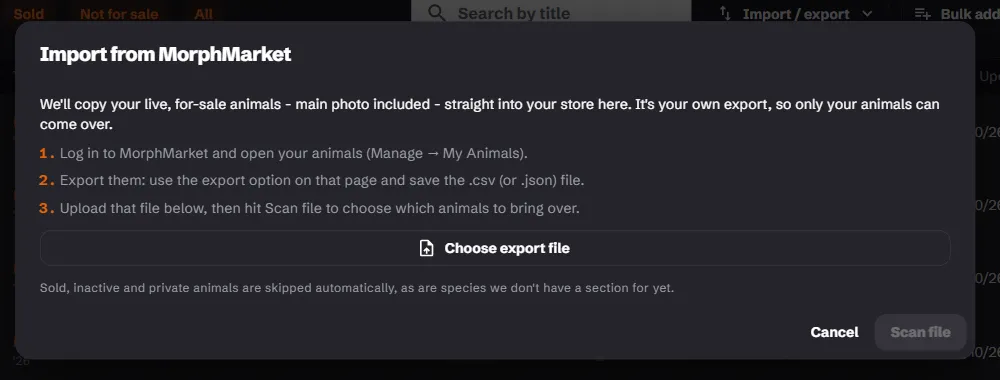
- Go to My animals → Import / export → Import from MorphMarket.
- Choose Choose export file and pick the file you saved.
- Choose Scan file. bask lists the animals it can bring over.
3. Import
Tick the animals you want, or Select all, then choose Import. bask brings them over one at a time, photos and all, and the bar shows how far it has got, so a big export takes a while. Keep the page open until it finishes. If you close it part-way, the animals already in stay, and importing the same file again brings over the rest.
Each animal comes in with up to five photos, its price and its morphs, matched from the title. A section with no morph list takes the morph line as written.
Animals that are ready, and fit within your plan's listing limit, go live straight away. The rest arrive as drafts.
What's skipped
- Sold, inactive and private animals.
- Farmed, captive-hatched, imported and wild-caught animals, which can't be listed on bask.
- Species bask has no section for yet.
- Morphs on REPTA's prohibited list.
- Listings whose wording breaks the selling rules. The scan tells you which and why.
Afterwards
Check your drafts in My animals. The usual gaps are:
- the origin, where your export didn't say captive-bred or self-produced
- the Eating unassisted tick for babies (select them all and use Eating unassisted in the bar)
- your own photo, where MorphMarket had a stock photo or none
- an Article 10 number, or the confirmation that a boa isn't Annex A
- delivery: imported animals arrive as courier at the shipping price in your export, so change any you'd rather have collected
Selling in both places
Once imported, the two sites don't talk to each other. When an animal sells on MorphMarket, mark it sold on bask too: Sold in store in the stock room, or Mark sold in My animals. Change a price on one site and you'll need to change it on the other.
Importing again
Animals you've imported before are skipped, so you won't get duplicates. Importing a newer export only adds the animals that are new to it.
Careful with Replace. The Replace my imported listings with this file tick deletes every listing you imported before, and their photos, then imports the file in full. bask asks you to confirm first. Use it only when you want bask to match your export exactly. Listings you created on bask by hand are never touched.