

My animals lists everything you've listed, under For sale, On hold, Sold, Not for sale and All, with a search box. Tick several rows to act on them together.
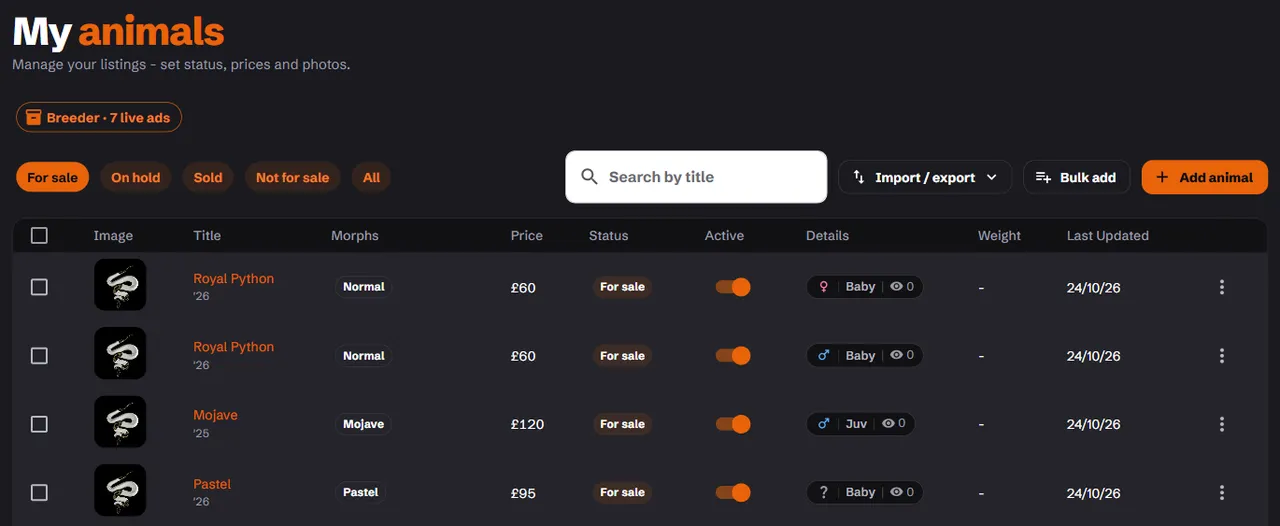
On the Breeder plan, the stock room shows the same listings on one screen built for larger stock.
Live or off
The Active switch on each row puts a listing on bask or takes it off. If something is missing, the listing tells you what. Tick several and use Activate or Deactivate to do them at once.
Switching off a live listing that's for sale asks whether it sold. If it did, mark it sold instead.
On hold
Reserve an animal for a buyer with Mark on hold and a Reserved until date, up to 60 days ahead. It goes back on sale by itself on that date, so a buyer who goes quiet costs you nothing.
Sold
Choose Mark sold. bask asks what it sold for. That's optional and only you see it. Once enough sales are noted, the prices go into guides showing what each morph sells for, with no names or stores attached.
Then Name the buyer from the people who messaged you about that advert. The buyer you name can review your store. You can also do this later from the listing's edit page, under Sold to.
A sold listing stays up as a record of the sale. That's better than deleting it: anyone following an old link still finds it.
Renew
Renew moves a live listing back to the top of the listings. How often you can renew depends on your plan. In between, the menu says how many days are left. Renew several at once and they're spaced 15 to 45 minutes apart, so a batch doesn't take over the page.
Put it on sale
On a listing's edit page, Put on sale runs a discount, as a fixed price or a percentage off, for up to 7 days.
A listing can go on sale once it's been listed for 15 days without a price rise. Price cuts don't count. Changing the base price ends a running sale. Buyers can trust a sale on bask is a real one.
Delete
Delete removes a listing for good. If it was live and for sale, bask asks whether it sold first.
Emails about missing details
If a live listing is missing something an advert now needs, bask emails you once with what it needs and an edit link. If it's still missing 15 days later, the listing is switched off. Nothing is deleted, and it isn't a strike: add the detail and switch it back on.