

Your livestock list is your stock written the way the trade writes it: count, animal, year and price, grouped by section. bask makes it from your stock room, so it's always up to date, and it comes with the Breeder plan.
The public list
Your list lives at baskmarket.co.uk/@your-handle/livestock. On your store page, the Shop tab gets a Cards / List switch, and List opens it.
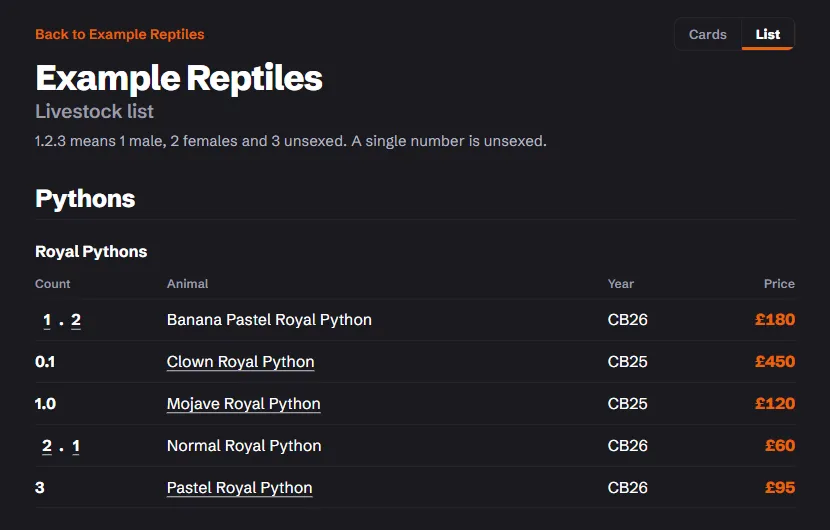
- It shows live lines that are for sale. Drafts never appear.
- Lines that match on species, morph, year, origin and price are merged into one line with a ratio. A male, two females and three unsexed print as
1.2.3, and each part links to its own advert. - A pair or group sold together shows as one line marked pair or group.
- The page explains the notation in one line for your customers: 1.2.3 means 1 male, 2 females and 3 unsexed, and a single number is unsexed.
A store with nothing live has no list yet. It appears as soon as your first line goes live.
Copy as text
In the stock room, Copy as text puts the same list on your clipboard as plain text, ready to paste into a Facebook post, a forum or a message. It ends with the link to your public list.
- Each live line carries the short link to its advert.
- Tick Include lines not yet on bask to add your drafts as well. They carry no link, because they aren't on the site yet.
If your browser won't copy, the stock room shows the text in a box so you can select it and copy it yourself.